

I submitted my first iOS app this week. BlinkFi reads the WiFi details off the printed card in a hotel room or an Airbnb and joins the network, so you never type a sixteen-character password with your thumbs again. Text recognition, a widget, StoreKit, the lot.
It got rejected. Here's the part of the message that matters:
Guideline 5.1.1(iv) - Legal - Privacy - Data Collection and Storage

The app encourages or directs users to allow the app to access the camera.
Specifically, the app directs the user to grant permission in the following way(s):

- A custom message appears before the permission request, and to proceed
  users press a "Enable" button. Use words like "Continue" or "Next" on the
  button instead.
The whole review came down to six letters.
The screen in question
The Scan tab is the camera. I didn't want the system prompt to ambush someone the moment they open the app, so on first launch, before iOS has ever asked about the camera, the tab shows a primer instead. A viewfinder icon, "Scan with your camera", one sentence saying BlinkFi reads the network name and password from the card and nothing leaves the phone. Under that, a big button that said "Enable camera".
Tapping it called AVCaptureDevice.requestAccess(for: .video), and iOS showed its usual alert with my usage string. Explain first, then ask. I thought I was being polite.
Why "Enable" is the problem
The rejection points at the guideline, but the actual rule lives in the Human Interface Guidelines, in the Privacy page's section on custom screens shown before a permission alert. The reasoning is that the decision happens in the system alert, not on your screen. Or as the HIG puts it, "people don't allow anything in a pre-alert screen."
So a button that sounds like the decision is a nudge. If my big blue button says "Enable camera", you've half agreed before the alert even shows up, and the alert's Allow button is sitting right where your thumb already wants to go. Apple's word for that is manipulation. "Continue" doesn't promise anything except that something comes next.
Is that a bit precious, given both buttons call the exact same function? Yes. Is it wrong? I can't really argue that it is. "Enable camera" describes an outcome, and the outcome isn't mine to promise.
The fix:
 Button(action: onContinue) {
-    Label("Enable camera", systemImage: "camera.fill")
+    Text("Continue")
         .frame(maxWidth: .infinity)
 }
The rule the reviewer didn't mention
Before resubmitting, I read that HIG section properly. The first rule isn't about wording at all. It says to include only one button, and to make it clear that it opens the system alert.
My primer had two. Under "Enable camera" sat "Choose from Photos", for people who'd rather pick a screenshot than point the camera at anything. It felt friendly. According to the HIG, it's a way to leave the screen without ever seeing the alert, which is exactly the kind of extra action it tells you not to add.
The reviewer didn't flag it. The next reviewer might, and I'd rather not find out one rejection at a time. So the button went.
By then I'd already archived and uploaded build 3 with just the wording fix. Build 4 it is.
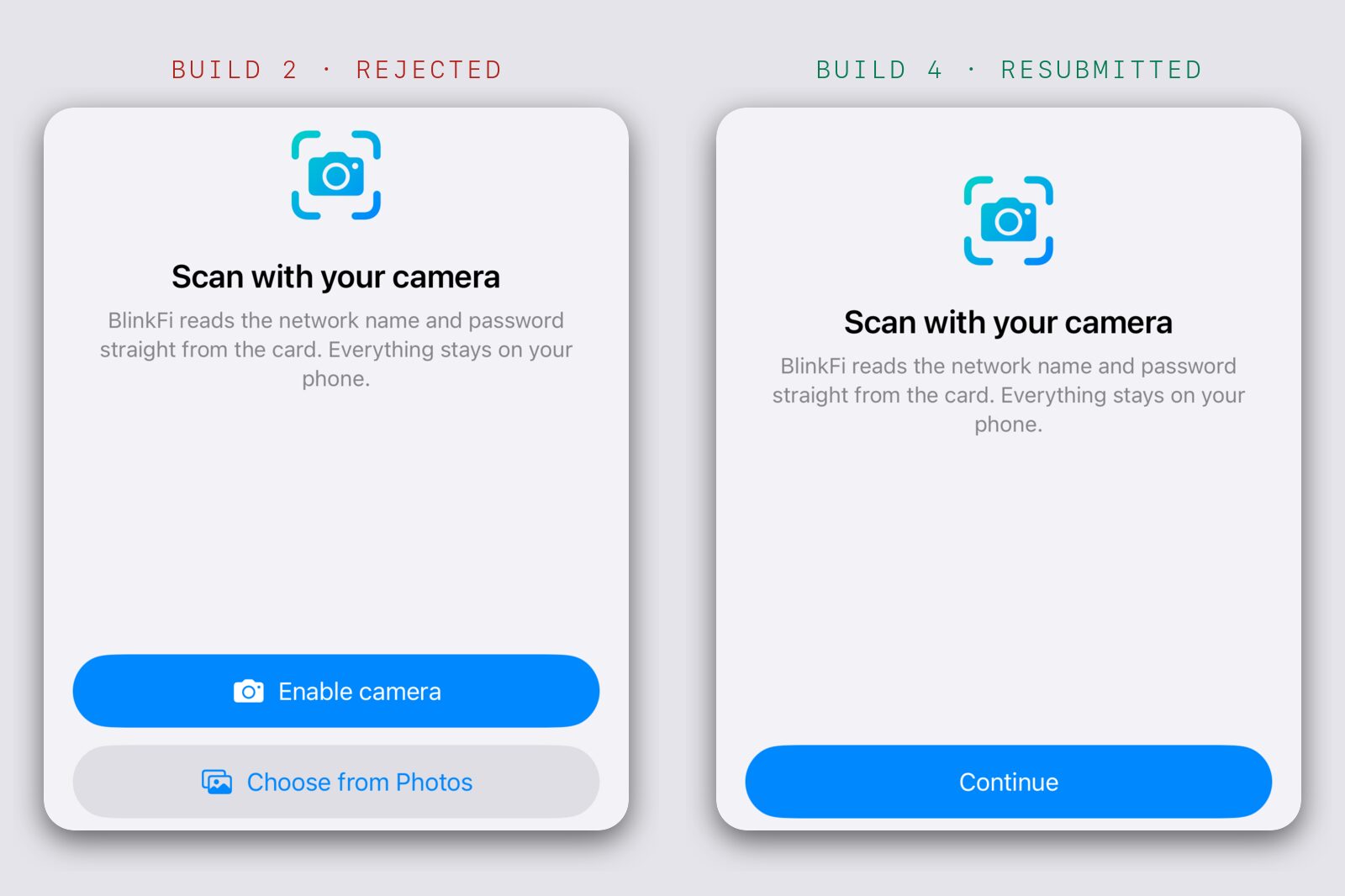
Nobody gets stuck because of it. Choose from Photos is still there in the camera view. And if you decline the alert, the Scan tab switches to a screen that says why the camera is needed, with an Open Settings button and the photo picker. That's the part 5.1.1(iv) actually cares about: if someone says no, give them another way in.
Takeaway
A pre-permission screen is allowed to explain. It isn't allowed to ask. One button, call it Continue, and keep the alternatives for the screen people see after they've said no.
And read the HIG page before you hit submit. A rejection lists what the reviewer noticed, not everything the guideline says.